Lenovo South Africa Channel Awards
Congratulations to our Server Team. Distributor of The Year!







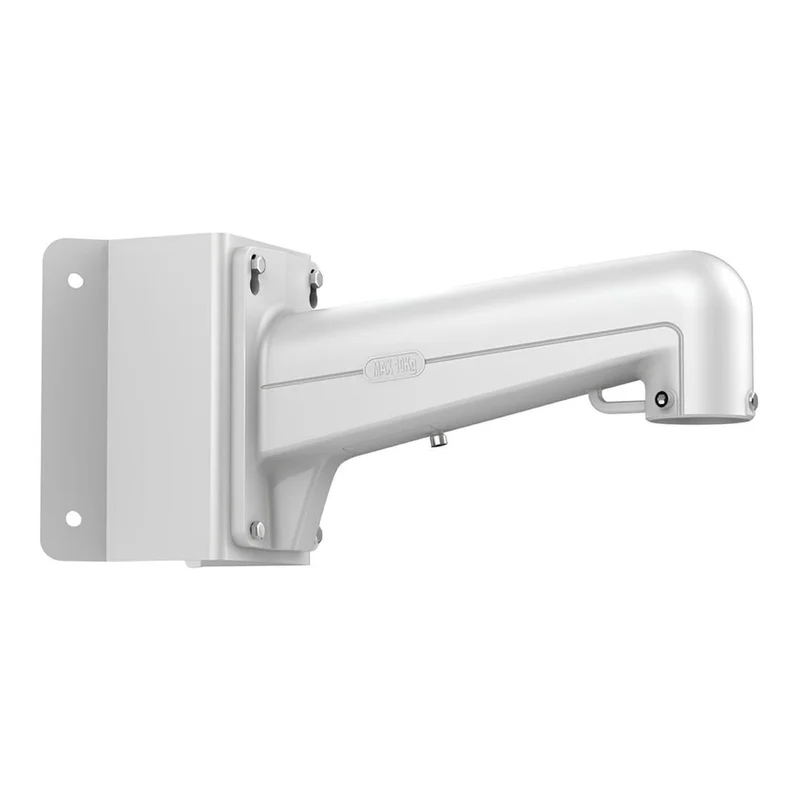
The Hikvision DS-1602ZJ-Corner is a corner mount wall bracket for speed dome cameras. It allows a speed dome to be fitted to the outside corner of a building, where it can cover two faces of the structure or two approaches that meet at the corner. It is listed in the Hikvision IP video accessories range, so it belongs to the same family of products as Hikvision network cameras and recorders.
A speed dome is a pan-tilt-zoom camera that can rotate, tilt and zoom to follow activity across a large area. Those capabilities are most useful when the camera sits high on a building and has a clear view down the sides of the property. A corner bracket is one way of placing the camera in that position without fitting it to a flat wall, a pole or a ceiling. The bracket spaces the camera out from the building so that the dome has room to move and an unobstructed field of view.
The DS-1602ZJ-Corner is a mounting accessory. It is not a camera and does not record video. It holds a speed dome camera at a corner position and gives the installer a fixed, stable point from which to aim the camera. Installers use this type of bracket where a standard wall mount would leave the camera pointing at a blind area, or where the corner of a building is the best available location for coverage.
Please check the bracket against the speed dome model and the supplier documentation before installation. Model compatibility, dimensions, weight limits and included fixings are not listed in the product information held here, so these should be confirmed directly with the supplier or the Hikvision datasheet.
The bracket is suited to a range of commercial and residential security projects:
A corner installation needs a solid building corner that can carry the camera and bracket securely. Cable routing should be planned before mounting so that power and network cabling are protected and kept out of the way of the moving dome. Where the camera is outdoors, cable entries and connections should be sealed against weather. A qualified installer should set the camera’s pan, tilt and zoom limits and confirm the view on site.
Using accessories from the same manufacturer as the camera and recorder helps the parts fit together as one system. A matched bracket, camera and recorder reduce the risk of mounting problems and make it easier to plan the view, the cabling and the recording setup. For security integrators, the DS-1602ZJ-Corner offers a straightforward way to place a speed dome at a building corner as part of a larger Hikvision IP video installation.
If you are planning a corner installation, confirm the camera model, the mounting surface and the viewing area first. This will help you order the correct bracket and avoid delays on site.