Epson Drawer Kick Cable: A Practical Connection for Epson Receipt Printers
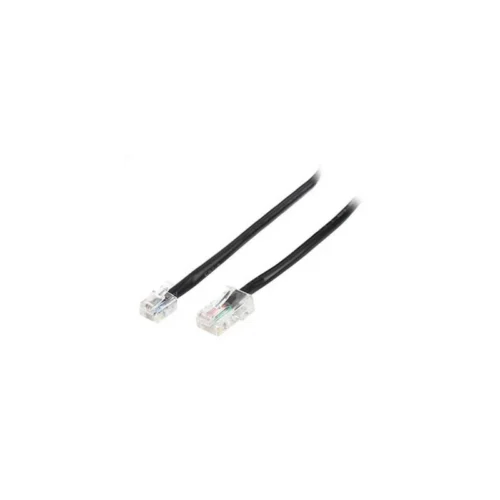
The Epson Drawer Kick Cable (article number TMKICKCAB) is a cable designed to connect a cash drawer to an Epson receipt printer. It is one of the accessories that make a point-of-sale station work smoothly, because it lets the printer open the cash drawer automatically when a transaction is printed. For shops and businesses that rely on Epson receipt printers, it is a simple but important part of the till.
Epson POS printers are used in many retail, hospitality and service environments. Alongside the printer itself, a cash drawer is usually installed at the same till. The drawer kick cable provides the physical connection between the two, so that the drawer can respond to commands sent from the printer. This removes the need for staff to open the drawer manually and helps keep the sales process consistent.
Key Features
- Designed as a drawer kick cable for Epson receipt printers
- Connects a cash drawer to the printer at the point-of-sale
- Listed in the Epson POS accessories and cables range
- Suitable for everyday till use in retail and hospitality environments
- Article number TMKICKCAB for easy identification when ordering
How the Drawer Kick Cable Works
In a standard setup, the receipt printer is connected to the till and the cash drawer is connected to the printer through the drawer kick cable. When a sale is completed and the receipt is printed, the printer sends a short electrical signal through the cable. That signal triggers the drawer to open, allowing staff to store cash or make change. The process happens as part of the normal printing cycle, so it adds little time to each transaction.
Typical Uses
- Opening the cash drawer automatically after a receipt is printed
- Equipping a new Epson receipt printer and cash drawer installation
- Replacing a worn or damaged drawer cable at an existing till
- Supporting restaurants, shops, pharmacies and service counters with Epson POS hardware
Choosing the Right Cable
Before ordering, confirm that the drawer kick cable suits the printer and cash drawer already in use. The printer port and the drawer connector both need to match. If you are unsure which cable is needed, check the existing hardware or ask a qualified POS technician. Buying the correct cable at the start avoids delays at the till and ensures the drawer operates reliably.
Installation and Care
Route the cable neatly behind the counter so it is not pulled or trapped when the drawer opens and closes. Keep connectors clean and dry, and check the cable regularly for signs of wear, such as fraying near the plugs. Replacing a damaged cable promptly helps prevent a drawer that fails to open during busy trading hours.
Why Use an Epson Accessory
Using accessories designed for your existing Epson POS equipment keeps the whole till setup consistent. Cables matched to the printer make it easier to set up and maintain the system over time. For businesses that depend on steady checkout operations, a reliable drawer connection is a small investment that supports daily sales.
The Epson Drawer Kick Cable is a simple, dependable accessory for anyone running Epson receipt printers with a cash drawer. It is a useful addition to any point-of-sale station, and a practical part to keep on hand for maintenance or upgrades.