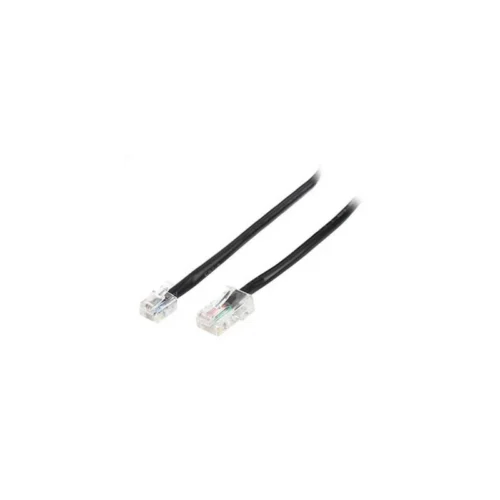
Epson USB Printer Cable (A006-USB) for Epson POS Printers
The Epson USB Printer Cable, article number A006-USB, is a dependable connection cable for Epson point-of-sale printers. It provides the USB link between the printer and a computer or till system, allowing the point-of-sale software to send receipts, slips, and other print output directly to the printer. Because the cable is part of the POS accessories range, it is designed for the everyday demands of a retail counter rather than a home office.
Point-of-sale printers work hard. They print receipts many times a day, often in environments where cables are pulled, bent, and moved when counters are cleaned or equipment is rearranged. A good quality connection cable helps keep the printer communicating with the till, which in turn keeps customers served without delay. If a cable fails, the printer may stop responding and the till may show a connection error, so keeping a spare on the shelf is a sensible precaution for any business that depends on receipt printing.
Product Overview
The A006-USB is a USB printer cable supplied as part of the Epson POS consumables and accessories range. It is listed in the cables section of the supplier’s price list, alongside other accessories for Epson POS printers such as interface cards, power supplies, and drawer-kick cables. Epson part numbers are not given for this item in the source information, so please confirm compatibility with your specific printer model before ordering.
Key Features and Specifications
- Brand: Epson
- Article number: A006-USB
- Cable type: USB printer cable
- Application: Connecting an Epson POS printer to a computer or point-of-sale system
- Range: Epson POS Printers accessories and consumables
- Supplied as: Single cable, sold as an accessory for POS printing setups
Specifications such as cable length, connector configuration, and Epson part number are not included in the supplier description. Check these details with the product team before purchase if your installation depends on them.
Typical Uses
The cable is used in several common scenarios in retail and service businesses:
- Connecting a new Epson receipt printer at a checkout counter
- Replacing a damaged or worn USB cable on an existing till printer
- Setting up a second or backup till station with a matching printer
- Equipping a point-of-sale workstation in a restaurant, shop, pharmacy, or service counter
- Keeping spare cables in a maintenance kit for quick repairs
Compatibility and Installation
Before fitting the cable, make sure the printer and the computer or till both have a USB port that matches the cable. Power down the printer and the computer before connecting the cable, then install or confirm the printer driver as recommended by the point-of-sale software provider. After connecting, print a test receipt to confirm that the link is working. If the printer does not respond, check the cable at both ends, try a different USB port on the computer, and confirm that the correct printer is selected in the software.
Care and Handling
To extend the life of the cable, avoid sharp bends near the connectors and do not pull on the cable to move the printer. Route it away from heavy traffic areas and keep it clear of hot surfaces and liquids around the till. Coil any excess cable loosely rather than tightly, which can strain the connectors over time.
Why Buy From Us
Accessories like this cable are often needed in a hurry, when a till is down and customers are waiting. Ordering the right cable the first time saves time and avoids unnecessary returns. If you are unsure which cable suits your printer, our team can help you confirm the match before you order, and we can advise on related Epson POS accessories you may need for the same setup.
In summary, the Epson USB Printer Cable A006-USB is a practical, straightforward connection accessory for Epson POS printing. It is ideal for new installations, replacements, and spares, and it fits naturally into the broader Epson POS accessories range.